> ## Documentation Index
> Fetch the complete documentation index at: https://resources.pipelinebio.com/llms.txt
> Use this file to discover all available pages before exploring further.
# Finding R&D Providers with Pipeline Bio
> How Members discover external R&D capability on Pipeline Bio: the Directory of Providers, the Catalogue of Capabilities, the AI Search Agent, shortlisting, enquiries, and RFPs.
Pipeline Bio is a discovery and engagement layer that brings structure, transparency, and efficiency to scientific outsourcing by centralising how research teams (Members) find and engage external Providers.
It is an independent Provider database structured using the Platform's Capability Taxonomy that gives Members a single place to find and engage with capabilities.
This article highlights the features that enable Members to find the right partner, faster. Whether they are an Australian biotech sourcing locally or an international team aiming to gain visibility into Australia's world-class capabilities.
There are two entry points into Pipeline Bio: the Directory of Providers and the Catalogue of Capabilities.
## 1. Browse by Provider: the Directory of Providers
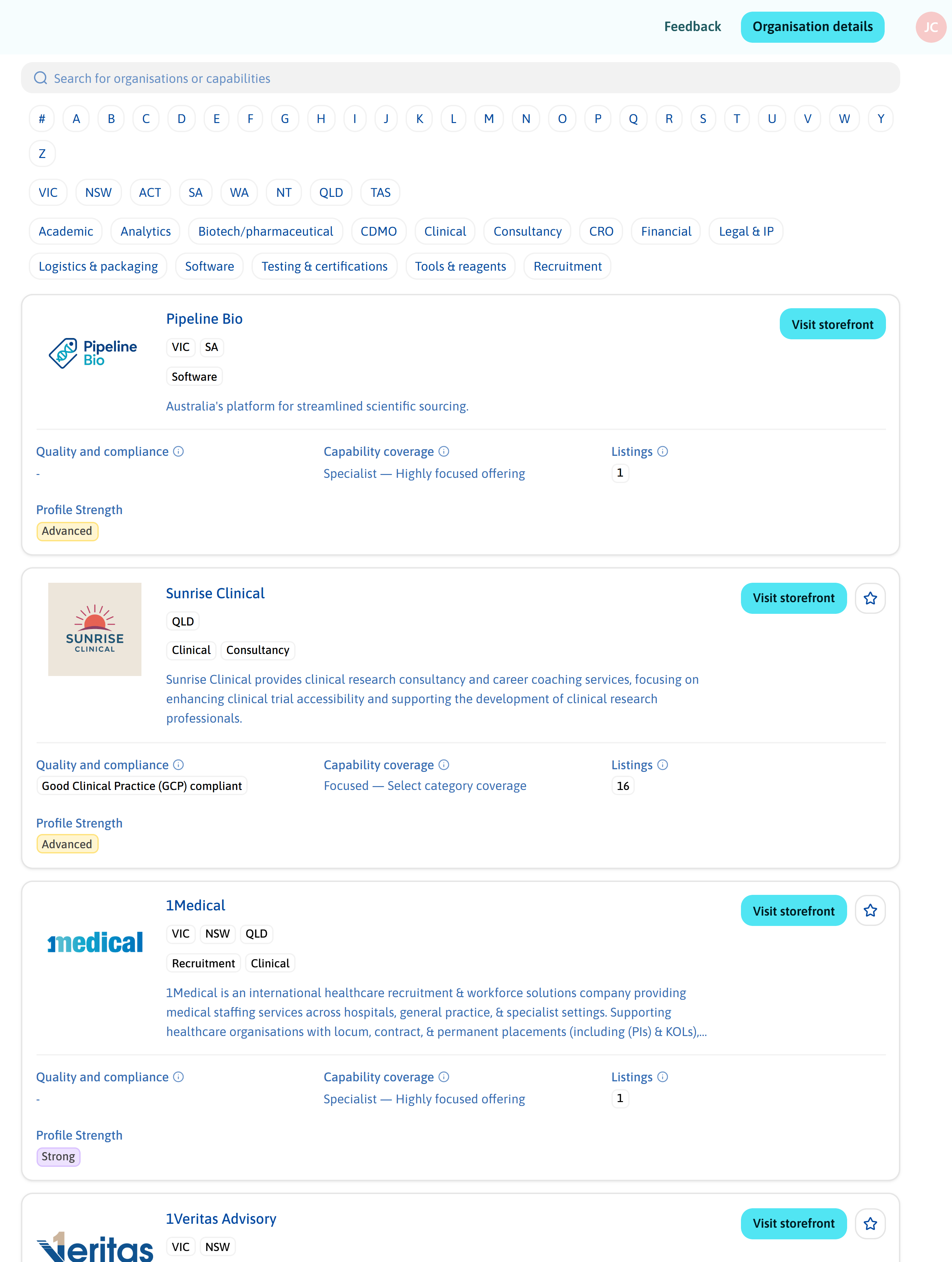
The Directory of Providers is the entry point for Members looking at the field of organisations itself, who is operating in Australia, and how they compare.
It lists Providers by Profile Strength and alphabetically, each with a dedicated Storefront: a single place to review an organisation and assess whether it fits.
Every Storefront follows the same format, so Members compare organisations on consistent terms rather than across company websites that each present themselves differently. Each shows the organisation's name and logo, its Australian Location, and a high-level Company Category: CRO, CDMO, Academic, Clinical, Consultancy, Analytics, Testing & Certifications, Software, Tools & Reagents, Financial, Legal & IP, Biotech / Pharmaceutical, Logistics & Packaging, or Recruitment.
Alongside it sits the Company Bio, Quality and Compliance Accreditations (ISO, GxP, and similar), and website.
Capability Coverage indicates how broad or specialised a Provider is — Specialist, Focused, Diversified, or Full Service — which signals whether the organisation matches the scope of the work.
The number of Capability Listings indicates depth, Profile Strength indicates how completely a Provider has documented its offering, and the Capability Radial presents that coverage graphically so it can be compared side by side between Providers.
Clickable Tiles link out to the Provider's own website, collaborations, events, or news.
Each Storefront also lists the Provider's Capabilities with their name, description, full Classification, and whether the work is offered as fee-for-service, collaboration, or a licensing opportunity.
Filters narrow the view by keyword or combinable tags. The defaults are deliberately unbiased, reflecting how procurement teams evaluate options before any commercial conversation begins. Pipeline Bio does not rank or promote Providers.
Members who have worked with a Provider before can Endorse them with confidential feedback, which also contributes to that Provider's Profile Strength. Providers can display the logos of past and present customers and partners.
## 2. Browse by Capability: the Capability Taxonomy
Some sourcing starts with a company in mind. Often it starts with the work itself, with no particular Provider attached to it yet. This is the question the existing network frequently cannot answer: who else can do this work?
The Catalogue of Capabilities is built for that case. It lets Members search the market by capability rather than by company name.
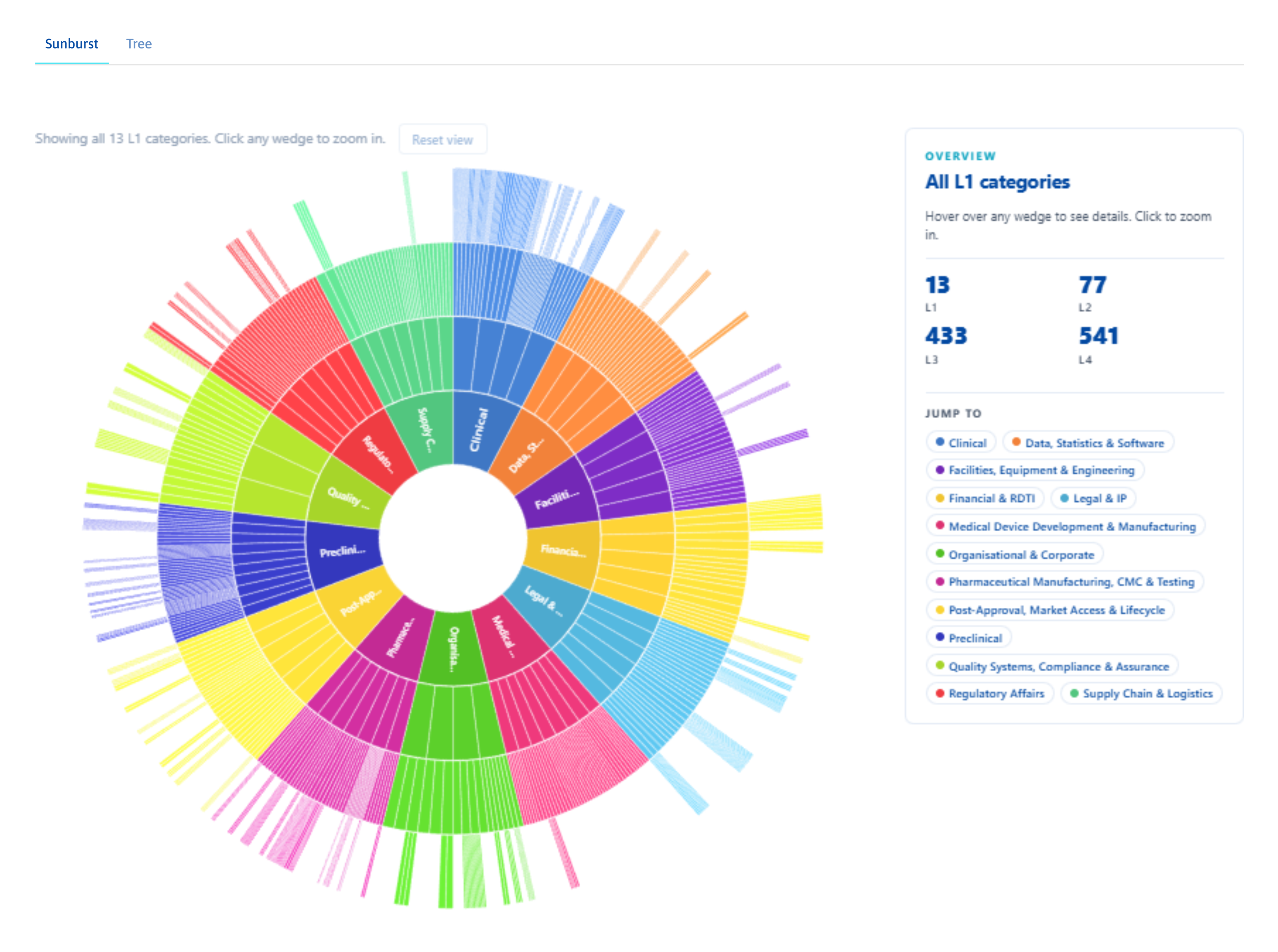
Capabilities in the catalogue sit inside a hierarchical Capability Taxonomy that runs from broad domains down to highly specific sub-categories across four levels. A typical Classification reads:
Clinical → Clinical Research Lab → Sample Processing & Banking → PBMC Processing & Storage
That structure does two things. A Member who knows the precise technique can find every Provider offering it, regardless of how each Provider worded its own listing, so a relevant Provider is not missed on a difference in vocabulary. A Member who knows only the program area can browse downward into the detail without needing the exact term first.
An interactive sunburst view or table tree, available in the [resources section](https://www.pipelinebio.com/resources) via **Inspect taxonomy**, gives a visual route through the same hierarchy.
For more on how the taxonomy is built and how it helps Members find and compare capabilities, see our [article on the Capability Taxonomy](/resources/articles/capability-taxonomy).
## Natural-language discovery: the AI Search Agent
Structured filters cover most procurement questions. Some do not fit cleanly into a category.
The AI Search Agent interprets free-text queries against the information available on the Platform and suggests relevant Providers or capabilities. It is particularly useful for specialised, cross-disciplinary, or less clearly defined capabilities, the kind of search that would otherwise become four browser tabs and three follow-up emails.
## Shortlisting and side-by-side comparison
Discovery is half the work. Comparison is the other half.
My Favourites lets Members save shortlisted Providers, attach private notes, and, using Compare Providers, view favourited Providers' Capability Coverage, type, and descriptions side by side. It moves the shortlist out of an inbox or spreadsheet into the same Platform where the discovery happened.
## From enquiries to RFPs
Members can contact Providers directly through the Platform using enquiries, secure messages that begin a conversation without surfacing contact details externally.
Every enquiry is visible only to the Member and that Provider and is managed under My Enquiries with open and closed tabs, in-Platform chat, and the ability to view quotes or attach an RFP.
For more formal engagement, the Platform's Request for Proposal template captures the project's full shape: objectives, background, compliance requirements, schedule, expected spend, and supporting attachments.
An RFP is a live, editable document. A Member can update it at any time, reuse the same RFP across multiple Providers, and keep a single auditable record of who it was sent to.
## Pro features for structured outreach
Beyond the standard Member toolkit, Pipeline Bio offers a Pro membership with a set of features built to help teams document and consolidate their outreach.
**RFP Summary Report** generates an auditable record of which Providers an RFP was sent to and how they responded. It downloads from the RFP view as a single document, useful for internal approvals, board reporting, and may support discussions with professional advisers regarding overseas outsourcing considerations.
**Provider Suggestions** auto-generates suggested Providers based on a completed RFP, drawing on the same Capability Taxonomy that powers the Directory and the Catalogue. The full RFP must be filled in for suggestions to surface.
**Request Non-Capability Statement** lets a Member ask a Provider to formally state that the enquiry or RFP requirements cannot be met; a completed RFP must be attached. The statement is then documented inside the RFP Summary Report.
## For international teams: assessing Australia without a local network
International teams may look to Australia for one of two reasons: access to the R\&D Tax Incentive, or to find a specialised capability not readily available at home.
Both decisions require the same input: a clear, structured view of what Australian Providers actually do, before any commercial conversation.
The Directory of Providers, the Catalogue of Capabilities, and the AI Search Agent give that view directly. A program manager in Boston, Cambridge, or Singapore can map Australian capability against a specific scope of work in an afternoon, without depending on referrals or local contacts.
The same documented discovery process supports the case internally and externally, showing which Providers were considered, on what basis, and why Australia was, or was not, the right place to run the work.
## Built for how research teams actually search
Pipeline Bio reduces friction in sourcing scientific capabilities by improving visibility, standardising how Providers are presented, and centralising discovery and early engagement.
The Platform is not designed to replace existing relationships. Trusted Providers stay trusted.
Pipeline Bio is for the moments when the answer sits outside the existing network, or when an auditable record of the search is part of the work.
For Providers, the inverse holds. Being discoverable in a structured Directory means high-quality enquiries arrive without bespoke marketing investment, and the Storefront itself becomes a single source of truth that other channels can point to.
Australia's life sciences ecosystem has breadth and depth. The slow, manual, network-dependent process of finding the right partner can obscure this fact, and is the problem Pipeline Bio addresses.
## Related
Be discoverable without adding overheads.
Step-by-step instructions for the Directory, Catalogue, and AI Search Agent.